VECTOR IMAGES:
 http://www.sanctuarymedia.com/edtechexpert/wp-content/uploads/2012/12/bitmap-vs-vector.png
 http://www.sanctuarymedia.com/edtechexpert/wp-content/uploads/2012/12/bitmap-vs-vector.png
RASTER IMAGES:
 http://vector-conversions.com/images/raster_vs_vector_1.jpg
 http://vector-conversions.com/images/raster_vs_vector_1.jpg
THE PIXEL:
 http://www.officialpsds.com/images/thumbs/Super-Mario-Pixel-psd37077.png
COLOUR MODELS:

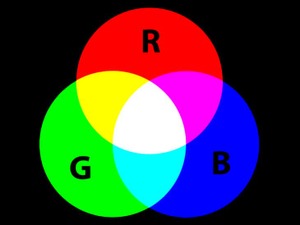

RESOLUTION:
ANTI-ALIASING:In computer graphics, anti aliasing is a software technique for diminishing jaggies - stairstep-like lines that should be smooth. Jaggies occur because the output device, the monitor or printer, doesn't have a high enough resolution to represent a smooth line. Anti aliasing reduces the prominence of jaggies by surrounding the stairsteps with intermediate shades of gray (for gray-scaling devices) or color (for color devices).
ASPECT RATIO:

FILE FORMATS -
bmp, png, gif, tiff, jpg, psd, pdf, eps and ai :

COMPRESSION:


IMAGE CAPTURE DEVICES:

easily sent or received electronically for example downloaded as part of a web
page.
STORAGE AND ASSET MANAGEMENT:

